ALLZONE PRODUCT · AI VOICE CRM
Zonified Connect
Sounds Like a Human.Sells Like a Pro.Works 24/7.
Every new lead called and texted on your own sequence, every conversation logged against the lead record, every appointment confirmed before it reaches a calendar.
- CHANNELS
- Voice · SMS · Email
- CALENDARS
- Google · Outlook
- PIPELINE
- 5 stages, agent-aware
- BUILT BY
- Allzone
THE GAP
A lead goes cold in the time it takes someone to notice it.
A form gets submitted. It lands in an inbox, or a dashboard, or a spreadsheet, and then it waits for a person to see it, decide it is worth a call, and find a gap between two other calls to make one. By the time anyone dials, the person on the other end has filled in three more forms and spoken to whoever rang first.
The usual fix is to hire someone to work the list, which turns a timing problem into a headcount problem and leaves evenings and weekends uncovered anyway. Zonified Connect closes the gap instead: the sequence runs the moment the lead arrives, on rules the business writes, and a person picks it up when there is something worth picking up.
THE PIPELINE
What happens next depends on where the lead is.
The agents are not running one script at everybody. Behaviour is defined per stage, including the stage at which they stop and your team takes over.
01New Lead
Arrives and is contacted
In through a webhook, the API, or a bulk import from CSV or spreadsheet with phone and email validation on the way. The sequence starts immediately.
02Connected
A conversation is running
The lead replied. The agent answers questions about what they asked for, and offers a call once there is real interest rather than at the first reply.
03Appointment Scheduled
A meeting is on a calendar
Booked only after the lead has confirmed a specific time and a contact email, then written to Google or Outlook with a confirmation sent out.
04Quoted
Your team has taken over
Automated contact stops here. The agent's job was to get a person in front of a person, and it is done.
05Closed
Out of automation
As is any lead that has gone silent for thirty days, until someone reactivates it deliberately.
HOW IT WORKS
The path every new lead follows.
- 01
A new lead arrives, and a text goes out immediately
A short intro message asking what they are looking for, sent the moment the lead lands rather than the next time someone checks.
- 02
No reply after the wait you set, and a second text follows
The interval is yours. So is whether this step runs at all.
- 03
They reply, and the conversation starts
The agent answers what they asked, and once they show real interest, offers a call.
- 04
They say yes, and the call comes a couple of minutes later
Briefed on the whole text conversation, so it does not open by asking what they have already answered.
- 05
Still nothing after two texts, and one check-in call goes out
One. Not a dialler working down a list.
- 06
An appointment is booked, and the lead moves stage
By text or on the call. Either way it lands on the calendar and the pipeline reflects it.
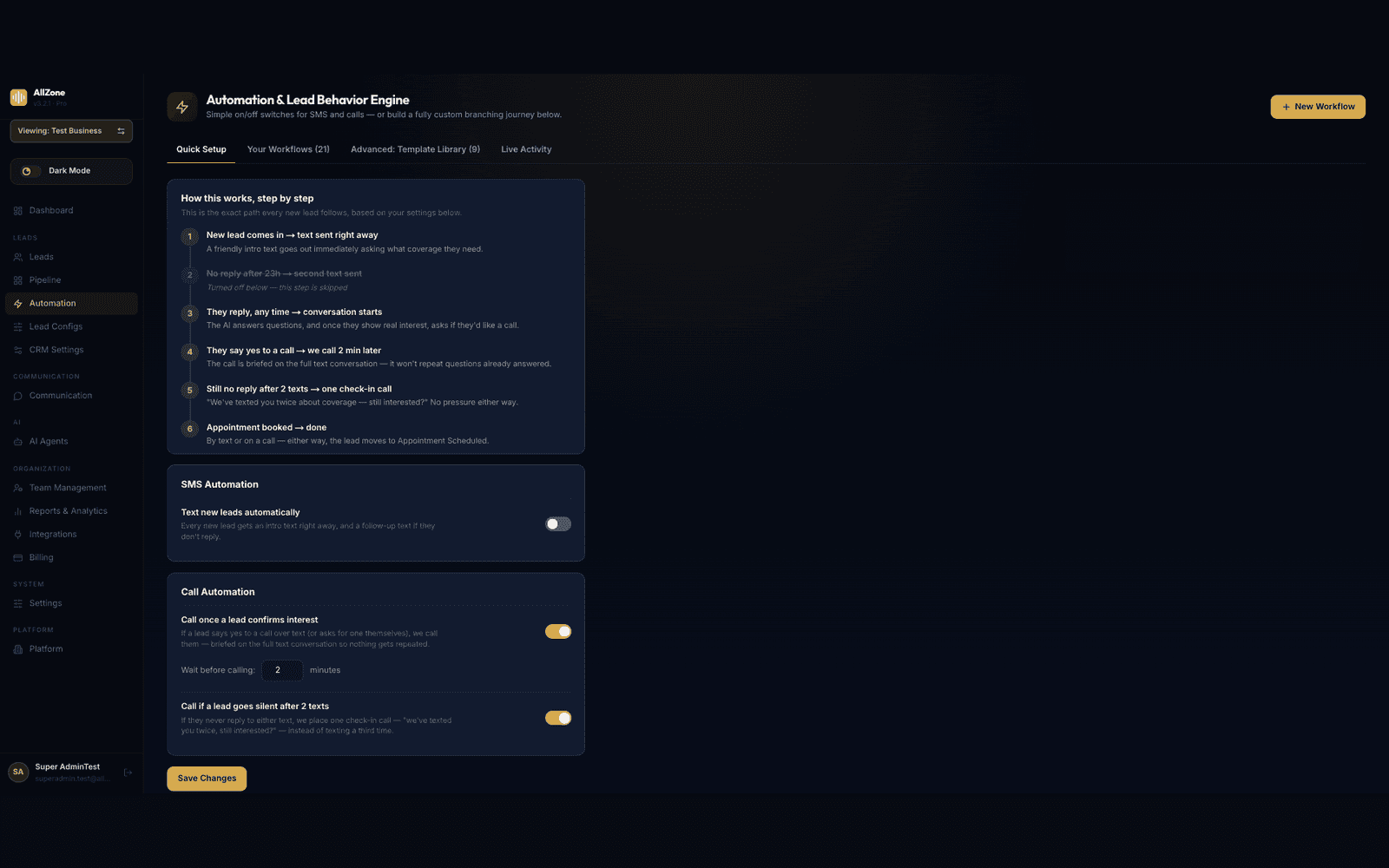
Every interval, and whether a step runs at all, is a setting.
YOUR PROCESS
Or build the sequence yourself.
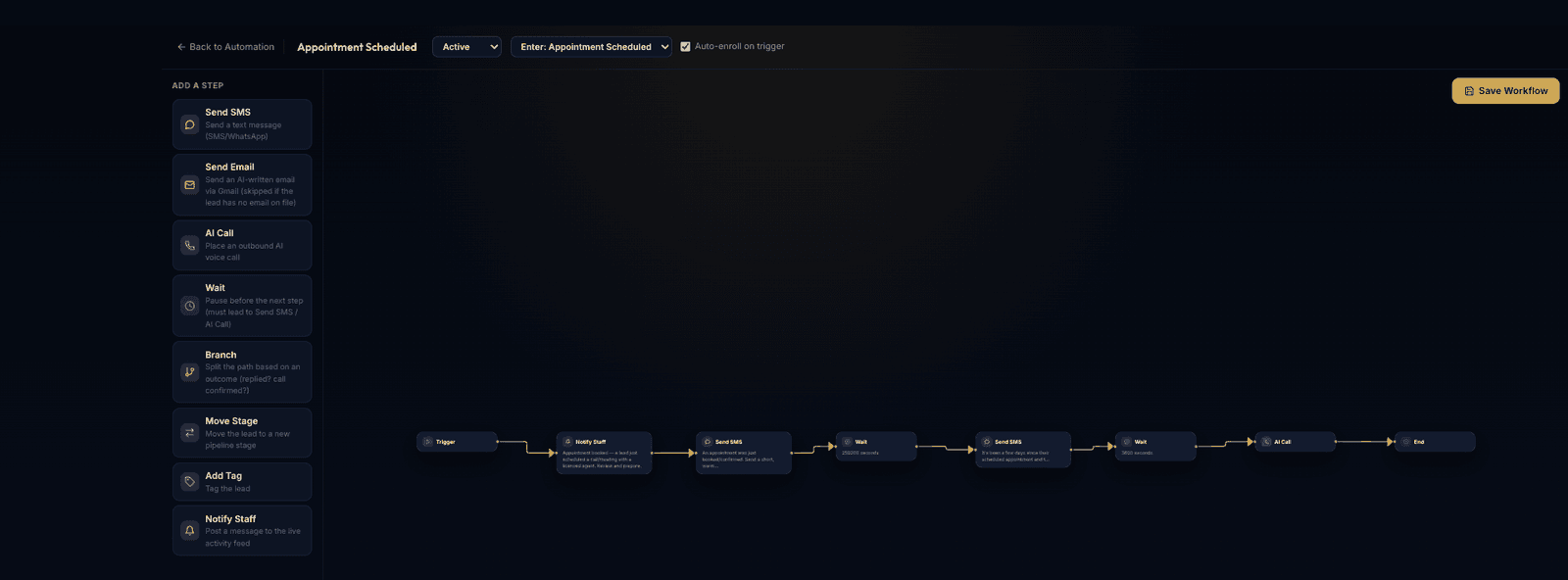
Quick Setup covers the common case. When your process is not the common case, the builder covers it without an engineer.
Send SMS
A text message, over SMS or WhatsApp.
Send Email
An AI-written email through Gmail, skipped when the lead has no email on file.
AI Call
An outbound voice call.
Wait
A pause before the next step.
Branch
Split the path on what actually happened. Did they reply? Was the call confirmed?
Move Stage
Advance the lead through the pipeline.
Add Tag
Tag the lead for routing or reporting.
Notify Staff
Post to the live activity feed so a person knows to look.
CAPABILITIES
What it does day to day.
One timeline per lead
Every call and text timestamped on a single record, alongside the activity log, a generated summary and a lead score. Nobody reconstructs a history from two systems.
Voice and SMS that coordinate
Separate agents for calls and texts, set to run together or in sequence, working from one shared view of the stage the lead is at.
Behaviour set per stage
What the agents do at New Lead is not what they do at Quoted, and the point at which staff take over is a setting rather than a convention.
Quick setup or full control
Toggles for the common case, and a visual builder with branching for the sequence that is actually yours.
Bulk import with validation
CSV or spreadsheet in, with phone and email checked on the way rather than discovered later by a failed call.
Access scoped by role
Agency administrator, business staff and customer views, so one workspace can hold several unrelated businesses.
GUARDRAILS
Why it is safe to leave switched on.
The reason teams switch a voice agent off is not that it cannot hold a conversation. It is that they cannot predict what it will do next. Each of these is a limit, not a setting someone has to remember.
It never books a meeting nobody agreed to
An appointment is created only once the lead has confirmed a specific time and a contact email. No inference, no best guess from a vague answer.
Retries are capped
Voicemail retries stop at a limit you set. There is no configuration in which this becomes a dialler that calls someone eleven times.
It stops when the lead has moved on
mated contact ends once a lead passes the active stages, so nobody who has already spoken to your team gets chased by software.
Silence is respected
Thirty days without a response and the lead drops out of mation entirely, until somebody reactivates it on purpose.
Timing is resolved in your time zone
Call timing, SMS timing and calendar invites all resolve against the business's own zone, not the server's.
CONNECTIONS
It plugs into what you already run.
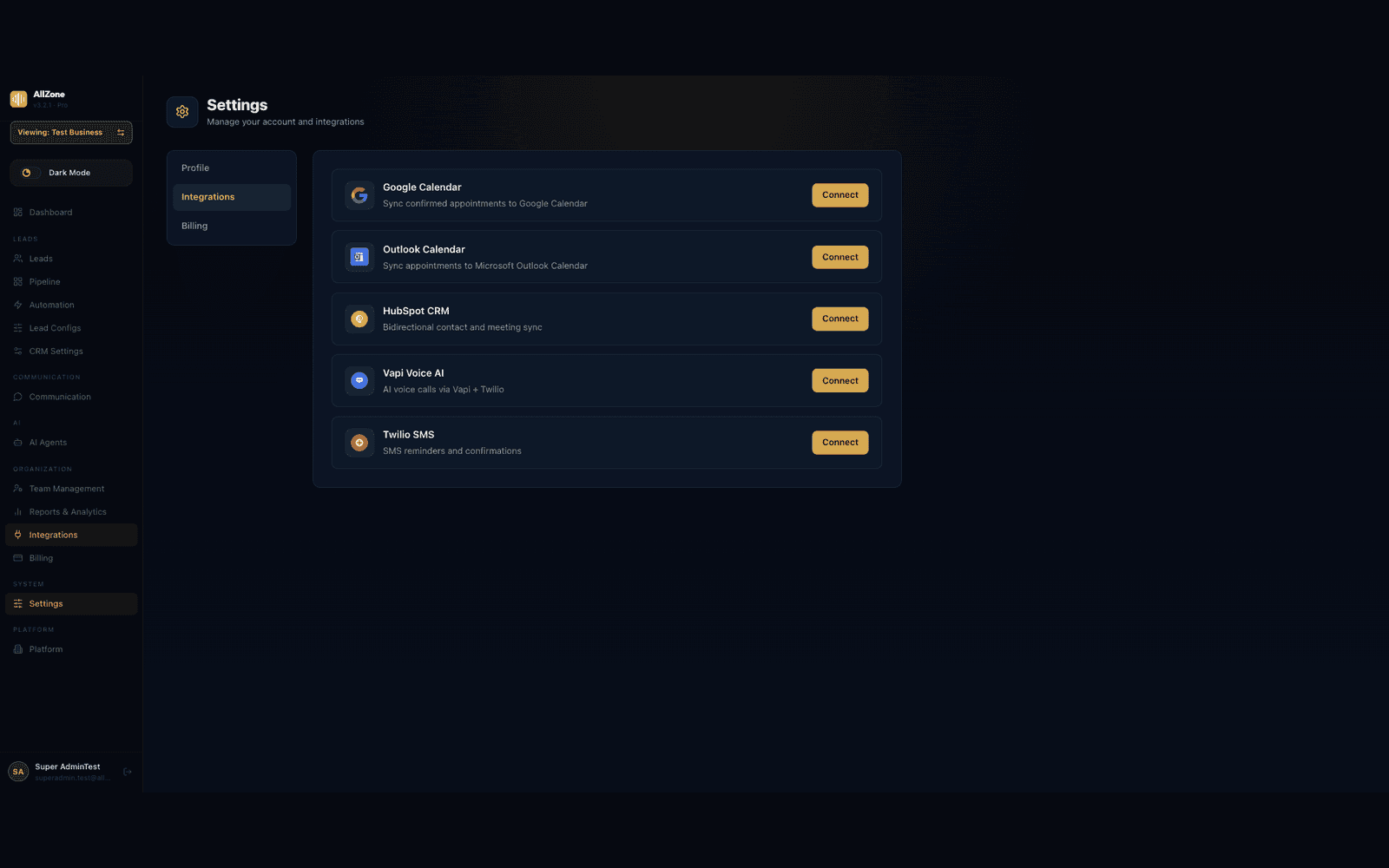
- Google CalendarConfirmed appointments synced straight to the calendar.
- Outlook CalendarThe same, for Microsoft shops.
- HubSpot CRMBidirectional contact and meeting sync, so Zonified Connect runs alongside a CRM you already have.
- Vapi Voice AIThe voice layer, over Twilio telephony.
- Twilio SMSTexts, reminders and confirmations.
FAQ
Before you ask.
No, and it is not configured to try. The agents work a lead up to the point where there is a real conversation to have, then hand over. mated contact stops once a lead reaches the Quoted stage, and the Notify Staff step exists so a person can step in at any point before that.
No. An appointment is created only after the lead has confirmed both a specific time and a contact email. Nothing is inferred from a vague reply, and nothing reaches a calendar without that confirmation.
Voicemail retries are capped at a limit you set, and after two unanswered texts the sequence places one check-in call rather than sending a third. A lead that stays silent for thirty days drops out of mation altogether until someone reactivates it deliberately.
Yes, and without an engineer. Quick Setup covers the common case with toggles and a wait interval. The workflow builder covers everything else: SMS, email, AI calls, waits, branches on what the lead actually did, stage moves, tags and staff notifications, arranged however your process runs.
It can. HubSpot syncs contacts and meetings in both directions. Leads also arrive by webhook or through the REST API, so a system that already captures them can pass them straight in.
Through a webhook, through the REST API, or as a bulk import from CSV or spreadsheet. Imports validate phone numbers and email addresses on the way in, so a bad number surfaces before an agent calls it.
Google Calendar and Outlook Calendar. Call timing, SMS timing and the invites themselves all resolve in the business's own time zone rather than the server's.
Yes. Access is scoped across agency administrator, business staff and customer views, so a single workspace can hold several unrelated businesses without their leads or pipelines mixing.
NEXT STEP
See it work a lead.
The quickest way to judge this is to watch it handle one. Send us a number we can call and a rough idea of how your team follows up today, and we will show you the sequence running against it.